





For years, the post editor has lived a double life. The Site Editor renders your blocks inside an iframe. The post editor — where most people actually spend their time — renders them directly in the admin page. That split ends with WordPress 7.1: the post editor canvas will always be an iframe, on every theme, no matter what apiVersion your blocks declare. The Gutenberg plugin has been enforcing exactly this for months. If you ship blocks, assume the iframe.
If your block never touches the global document or window, you can probably stop reading after you’ve changed "apiVersion": 2 to "apiVersion": 3 in block.json. For everyone else — and especially anyone shipping blocks that wrap third-party libraries — the iframe changes where your code runs versus where your markup lives. That gap is where things break.
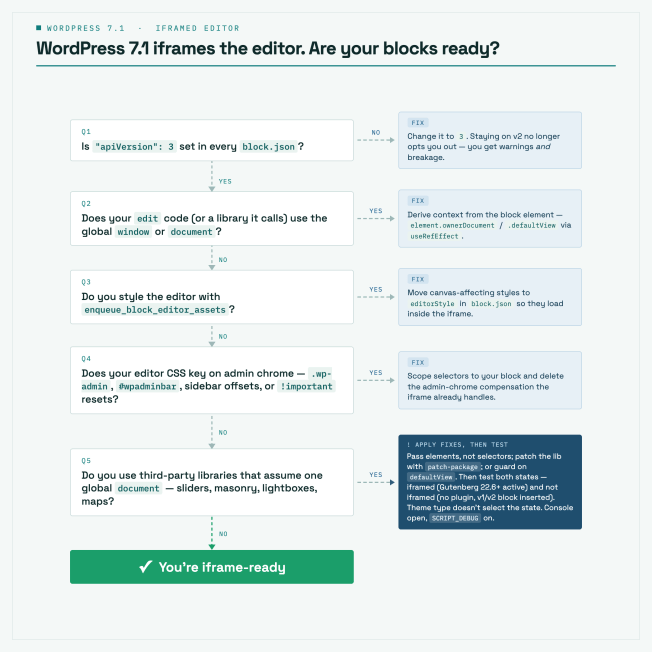
Quick reference guide: Are your blocks ready?


The timeline, in one table
| Release | What happens |
|---|---|
| June 21, 2021 | The iframed editor was announced on make.wordpress.org |
| WordPress 6.9 (Dec 2025) | Console warning (with SCRIPT_DEBUG) when a block registers with apiVersion 2 or lower. The block.json schema now only validates apiVersion: 3. |
| WordPress 7.0 (Apr 2026) | The iframe decision now looks at blocks actually inserted in the post, not every registered block. All inserted blocks on v3+ → canvas is iframed. Insert a single v1/v2 block → the iframe is removed on the fly. Nothing is enforced yet. |
| Gutenberg 22.6+ | The iframe is enforced regardless of theme — this is the feedback-gathering phase. |
| WordPress 7.1 (Aug 19, 2026) | The iframe is enforced on every theme, regardless of apiVersion. The conditions are gone, not tightened. |
The WordPress 7.0 change is subtle but important: before 7.0, one apiVersion: 2 block registered by any active plugin — even one never used in the post — kept the entire editor out of the iframe for everyone. Now only inserted blocks count. Your v3 block gets the iframe until the user inserts a legacy one, at which point the editor quietly reloads the canvas without the iframe. The companion plugin ships a legacy-api-v2 block so you can watch this happen — insert it into an otherwise-v3 post and the iframe disappears. In 7.1, that escape hatch closes.
Worth knowing, as an aside: the “every theme” decision landed in WordPress 7.1 Beta 1, and it’s deliberately being tested in public. Gutenberg merged “Post editor: always iframe” (#74042) on July 10, 2026, deleting the theme and apiVersion conditions outright. The 7.1 release lead signed off on that merge on the condition that the team could “move to the softer approach” if Beta 1 feedback surfaced real problems — the softer approach being enforcement on block themes only, with everything else staying on the 7.0 rules. No specific mechanism is committed to; the plan is to respond to what the beta actually turns up.
Which is a reason to test harder, not to wait and see. If that rollback happens, the iframed and non-iframed editors both stay in the wild longer — and your block has to work in both regardless of which way it goes.
It’s also worth noting that blocks that will break with the 7.1 changes are most likely already breaking in the Site Editor.
Why the iframe is a good thing
This isn’t change for change sake. Rendering the canvas in an iframe gives the editor a real document boundary:
- Admin CSS stops leaking into your content. No more
#wpadminbar-adjacent style resets, no more admin styles subtly changing how blocks render in the editor versus the front end. - Viewport units and media queries finally work.
vw,vh, and@mediarules resolve against the canvas, not the admin page — so tablet/mobile previews and zoomed-out views actually behave like the front end. - What you see is much closer to what you get. The canvas document is built from your theme’s styles, not the admin’s.
The issue this raises for block developers? Your editor JavaScript runs in the admin page, but your block’s DOM lives in a different document. Every assumption baked into document.querySelector(...) and window.addEventListener(...) just became wrong.
What actually breaks (and how to fix it)
Everything below is demonstrable with the companion plugin — each pattern ships as a broken/fixed pair of blocks: iframe-editor-examples on GitHub.
1. Global window and document references
The classic: a block that reads the viewport or listens for resize.
// ❌ Broken in the iframed editor
useEffect( () => {
	const update = () => setWidth( window.innerWidth );
	update();
	window.addEventListener( 'resize', update );
	return () => window.removeEventListener( 'resize', update );
}, [] );
Editor scripts load in the admin page, so window is the admin window. In the iframed editor this reports the wrong width and never reacts to the canvas resizing — switch to the Tablet preview and the number doesn’t move.
The fix is to derive the document and window from your block’s own DOM element:
// ✅ Fixed — works iframed or not
import { useRefEffect } from '@wordpress/compose';

const ref = useRefEffect( ( element ) => {
	const { defaultView } = element.ownerDocument;
	const update = () => setWidth( defaultView.innerWidth );
	update();
	defaultView.addEventListener( 'resize', update );
	return () => defaultView.removeEventListener( 'resize', update );
}, [] );

const blockProps = useBlockProps( { ref } );
Two things to notice:
element.ownerDocumentis whatever document the block is rendered into — the iframe’s document when iframed, the admin document when not.ownerDocument.defaultViewis that document’s window. Code written this way is context-agnostic: it doesn’t care whether the iframe exists.useRefEffect(from@wordpress/compose) instead ofuseRef+useEffect: it re-runs the callback when the ref changes, so if the block ever moves between documents, your listeners re-attach to the right window.
2. “Close on outside click” and other document-level events
This one is my favorite because it fails weirdly. A dropdown that closes when you click outside, implemented the way every React tutorial teaches it:
// ❌ Broken in the iframed editor
useEffect( () => {
	const closeOnOutsideClick = ( event ) => {
		if ( ! containerRef.current.contains( event.target ) ) {
			setIsOpen( false );
		}
	};
	document.addEventListener( 'click', closeOnOutsideClick );
	return () => document.removeEventListener( 'click', closeOnOutsideClick );
}, [] );
In the iframed editor, clicks inside the canvas happen in the iframe’s document. They never bubble to the admin document, so the listener never fires. The result: click another block in the canvas and the dropdown stays open — but click the admin sidebar and it closes. Same code, same block, works perfectly in the non-iframed editor. This is the kind of bug report you’ll get from users that “can’t be reproduced” — because whoever tested it happened to have a v2 block sitting in their post, which quietly dropped the iframe and made everything work.
Fix: same principle, attach to element.ownerDocument instead of document (see the plugin for the full useRefEffect version).
3. Editor styles enqueued into the wrong document
If you’re styling your block’s editor experience with enqueue_block_editor_assets, those styles load in the admin page — outside the iframe. They silently stop applying the moment the canvas is iframed:
// ❌ Loads in the admin page — never reaches the iframed canvas.
function myplugin_enqueue_editor_styles() {
	wp_enqueue_style( 'myplugin-editor', plugins_url( 'editor.css', __FILE__ ) );
}
add_action( 'enqueue_block_editor_assets', 'myplugin_enqueue_editor_styles' );
The fix is to register editor styles through block.json, which WordPress injects into the canvas document, iframed or not:
{
	"editorStyle": "file:./index.css"
}(add_editor_style() also gets copied into the iframe, if you need theme-level editor styles.)
The demo plugin makes this visual: the same block carries a green banner from editorStyle and a red banner from enqueue_block_editor_assets. Count the banners — two means no iframe, one means you’re iframed.
4. Stale CSS written for the leaky editor
The section above is about CSS loading into the wrong document. This one is the sneakier inverse: the stylesheet loads into the right document — injected straight into the canvas, exactly as intended — and still gets it wrong, because of what it was written to describe. These are the rules that quietly stop matching, or start over-matching, once the canvas becomes its own document. It’s the code that’s been sitting in themes and plugins for years, “working,” right up until the iframe is enforced.
Selectors keyed on admin body classes
The most common one, and it fails exactly like the “close on outside click” bug — silently.
/* ❌ The canvas body no longer carries these classes */
.wp-admin .my-block { padding: 2rem; }
body.block-editor-page .my-block__title { font-size: 2rem; }
Inside the iframe, the canvas <body> is a clean document — no wp-admin, no block-editor-page. The selector matches nothing and your editor styling just evaporates. Same block, same stylesheet, works perfectly in the non-iframed editor.
/* ✅ Scope to the block, not the admin chrome */
.my-block { padding: 2rem; }
.my-block__title { font-size: 2rem; }
.editor-styles-wrapper does still wrap the canvas content inside the iframe, so .editor-styles-wrapper .my-block keeps working if you need genuinely editor-only styling — but the admin ancestor was almost never necessary in the first place.
Offsets that compensate for admin chrome
/* ❌ Subtracting the admin sidebar and adminbar from the viewport */
.my-fullwidth { width: calc( 100vw - 160px ); } /* 160px = admin menu */
.my-toolbar   { position: fixed; top: 32px; }   /* 32px = #wpadminbar */
This is the flip side of the win from earlier: now that 100vw resolves against the canvas instead of the admin page, there’s no sidebar to subtract — so the calc() overshoots, and top: 32px pushes your toolbar below an admin bar that doesn’t exist in this document.
/* ✅ The canvas is the viewport now — no compensation needed */
.my-fullwidth { width: 100vw; }
.my-toolbar   { position: fixed; top: 0; }
Specificity walls built to fight leakage
/* ❌ Cranked up to beat leaking admin styles */
.editor-styles-wrapper .my-block p {
	font-family: Georgia, serif !important;
	line-height: 1.6 !important;
	box-sizing: border-box !important;
}
The iframe already stops admin CSS from leaking in — that’s one of the reasons it’s a good thing. These !importants and resets have no admin styles left to override, but they do now override the theme styles the iframe loads into the canvas. The result: your editor preview drifts away from the front end — the exact opposite of what the iframe is for.
/* ✅ Let theme styles through; set only what your block truly owns */
.my-block p { font-family: Georgia, serif; }
Two things to notice:
- The pattern is the same as the JavaScript fixes: stop describing the admin, start describing your block. A selector that names
.wp-admin,#wpadminbar, or.block-editor-pageis reaching for chrome that isn’t in the canvas document anymore. - Most of these were workarounds for problems the iframe solves. Deleting them is usually the fix.
5. Third-party libraries that assume one global context
The biggest real-world hazard. Masonry layouts, sliders, lightboxes, maps — a generation of libraries was written assuming there is exactly one document:
// Inside some-legacy-lib.js
const targets = document.querySelectorAll( selector ); // finds nothing in the iframeYour block calls the library, the library queries the admin document, finds zero matches, and silently does nothing. No error, no warning — the block just stops being enhanced.
Your options, in order of preference:
- Pass elements, not selectors. If the library accepts an element (
lib.init( element )), hand it the block’s element fromuseRefEffectand you’re usually fine. - Patch the library. For unmaintained dependencies,
patch-packageis the pragmatic answer: edit the module innode_modulesto resolvedocument/windowfrom the element (node.ownerDocument), runnpx patch-package <pkg>, commit the patch, add apostinstallscript. The official migration guide walks through a real patch for@panzoom/panzoom. - Guard and bail. If the library is loaded inside the iframe (front-end scripts are), check for it on
defaultViewbefore using it:if ( ! defaultView.jQuery ) return;
So what does apiVersion: 3 actually do?
Less than you might think — and that’s the point. Declaring "apiVersion": 3 in block.json doesn’t change how your block renders; it’s a signal that your block is iframe-ready. All core blocks have been on v3 since WordPress 6.3. For most blocks the migration is literally a one-line change… followed by the actual work: testing that nothing in your edit component (or the libraries it pulls in) touches the global document/window.
And to be clear about 7.1: the iframe will be enforced there regardless of apiVersion. Staying on v2 doesn’t opt you out anymore — it just means you get the console warning and the breakage.
How to test today
You don’t need to wait for 7.1. What you’re testing is that your block works in both states — iframed and not — because both will exist in the wild for a while yet.
Iframed: install the Gutenberg plugin 22.6+. It enforces the iframe regardless of theme, so this is the fastest way to live in the future. 7.1 Beta 1 does the same — I’ve confirmed it forces the iframe on a classic theme, which is the merged behavior shipping in August.
Not iframed: run WordPress 7.0 without the plugin and insert a v1/v2 block alongside yours — the canvas drops the iframe on the fly. The companion plugin’s legacy-api-v2 block exists for exactly this. Any theme will do: core 7.0 has no theme check in the iframe decision at all, so you don’t need to hunt down a classic theme to reproduce this.
Confirm which state you’re in: element.ownerDocument !== document, or look for iframe[name="editor-canvas"] in devtools.
The Site Editor has been iframed for years — if your block already behaves there, you’re most of the way home.
The companion plugin ships a wp-env setup, an example override file that adds Gutenberg for enforced mode (copy it to .wp-env.override.json), and two Playground blueprints — one per state, so you can flip between iframed and not in two tabs without installing anything.
The block author’s checklist
- Set
"apiVersion": 3in everyblock.json. - Check your editor code for
window.anddocument.— every hit is a suspect. Replace withelement.ownerDocument/.defaultViewviauseRefEffect. - Check for
enqueue_block_editor_assets— move canvas-affecting styles toeditorStyleinblock.json. - Check your editor CSS for
.wp-admin,#wpadminbar, and.block-editor-page, admin chrome offsets and!important - Audit third-party libraries: pass elements not selectors, patch what you must.
- Test both states, not both themes: iframed (Gutenberg 22.6+ active) and not iframed (no plugin, v1/v2 block inserted).
- Watch the console with
SCRIPT_DEBUGon — the deprecation warnings tell you which registered blocks are still on v1/v2.
Resources
- Iframed Editor Changes in WordPress 7.0 — the dev note this all builds on
- Post editor: always iframe (#74042) — the merged PR that makes 7.1 always-iframed, and the discussion behind the beta-feedback plan
- Roadmap to 7.1 — the original block-themes-first plan, superseded by #74042
- Preparing the Post Editor for Full iframe Integration — the 6.9 groundwork
- Migrating Blocks for iframe Editor Compatibility — the official migration guide
- Block API Versions — what each version means
- Enqueueing editor assets
- Editor styles for themes
- Companion demo plugin: iframe-editor-examples


